


RHINO ATHLETICS BETA TESTERS
TEI Beta Tester
STARTER KIT.
Please take a few minutes to tell us a little bit about you. It will help us understand better how you use the app and the nature of the errors, frustrations or feature ideas you might share with us.
Install TEI on Your Phone
TEI Beta Tester
Starter Kit
– Preparation for Official App Launch, December 2026
In this TEI Beta Tester Starter Kit you will find how to install the TEI | Total Effect Index mobile app’s testable version, some helpful information about TEI, how to get some one-on-one guidance, how we would like for you to do your first two weeks with TEI, a quick snap shot demonstration, and how to get ahold of us for support and feedback.
📱 iPhone / iPad (iOS)
You will install the TEI app through TestFlight – Apple's official beta testing app, and that will give you access to the TEI app.
Step 1. CHECK YOUR INBOX: Open Invitation - On your iPhone, tap the testing link we just emailed you.
Step 2. Get TestFlight - On the webpage, tap “View in App Store”.
Step 3. Download TestFlight - Tap the download icon and wait for installation.
Step 4. Close the App Store - Once TestFlight is installed, tap “Done”.
Step 5. Return to Webpage - Scroll to Step 2 and tap “View in TestFlight”.
Step 6. Install TEI - In TestFlight, tap “Install” for TEI: Total Effect Index.
Step 7. Open TEI - Once installed, tap “Open”.
Step 8. Continue Setup - Review the information and tap “Next”.
Step 9. Start Testing - Tap “Start Testing”.
Step 10. Choose Notifications - Select any option. “Allow in Scheduled Summary” is recommended.
Step 11. Ready to Use - The TEI Login screen appears. Log in or create an account.
Good to know: When we release a new beta version, TestFlight will notify you. Just tap Update.
🤖 Android
Step 1. CHECK YOUR INBOX: Open Invitation - On your iPhone, tap the testing link we just emailed you.
Step 2. Get TestFlight - On the webpage, tap “View in App Store”.
Step 3. Download TestFlight - Tap the download icon and wait for installation.
Step 4. Close the App Store - Once TestFlight is installed, tap “Done”.
Step 5. Return to Webpage - Scroll to Step 2 and tap “View in TestFlight”.
Step 6. Install TEI - In TestFlight, tap “Install” for TEI: Total Effect Index.
Step 7. Open TEI - Once installed, tap “Open”.
Step 8. Continue Setup - Review the information and tap “Next”.
Step 9. Start Testing - Tap “Start Testing”.
Good to know: Updates will come through the Google Play Store like any other app – If the install button doesn't appear, wait a few minutes and refresh the page. It sometimes takes a little time to activate.
Setting It Up
Now that you have the installed the testable TEI app, it is time to open it and set it up for testing.
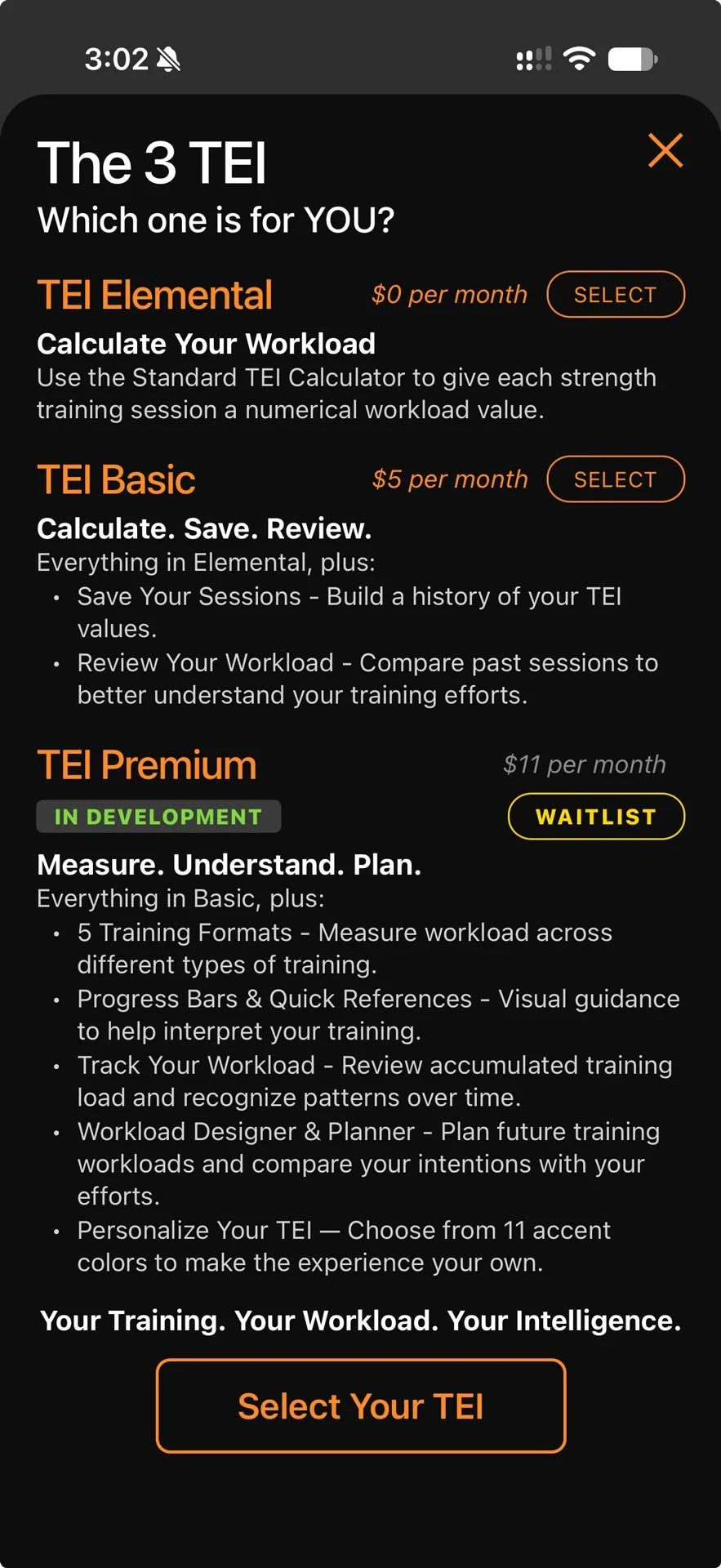
Step 1: To you create your account, you will be brought to this screen.
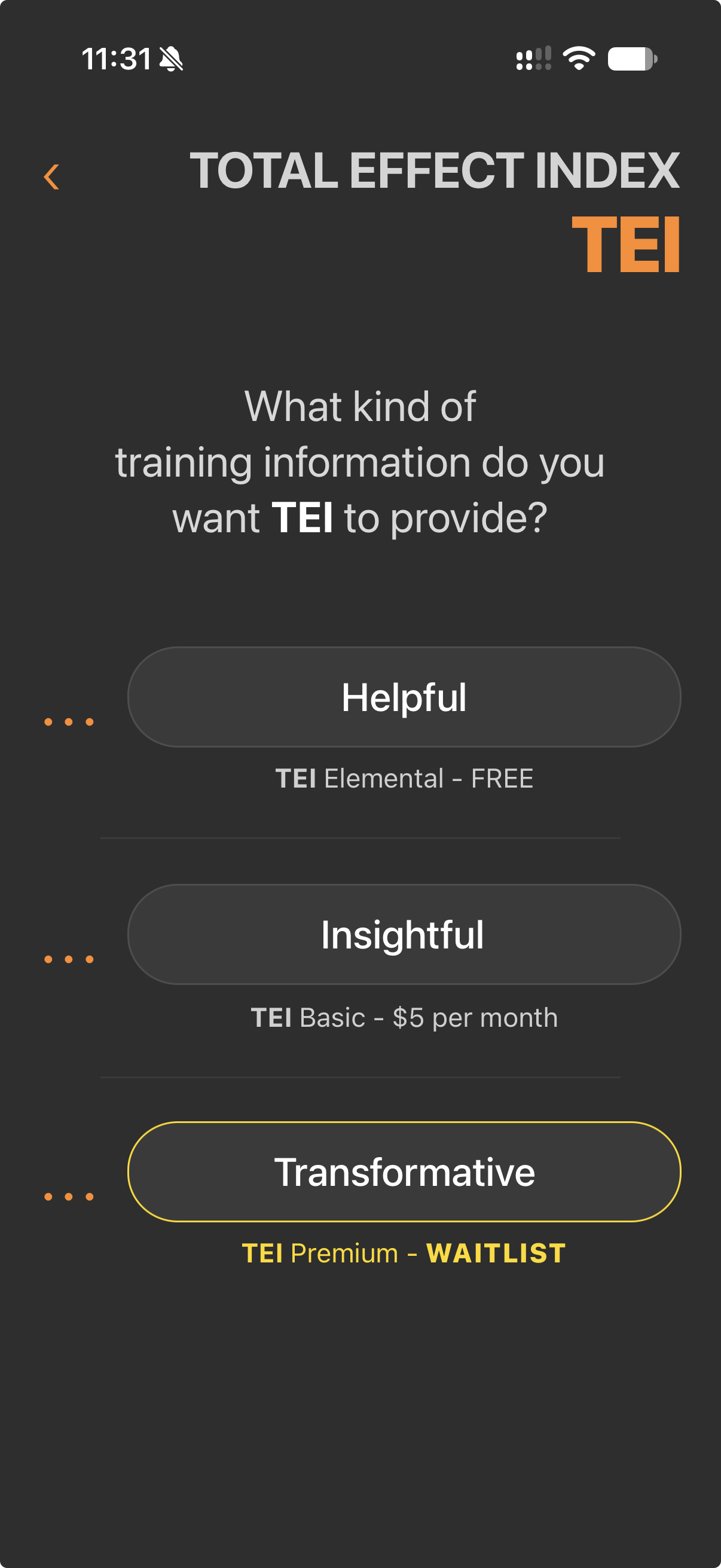
Step 2: Tap any of the 3 dots to select the level of TEI that fits you best.
Step 3: Then select the TEI that fits you best.
Step 4: While creating your account, if it asks you for a Credit Card number, use this fake credit card – Do NOT use a real credit/debit card, it will not work.
Credit Card #: 4242 4242 4242 4242
Expires: 09/29 CCV: 123
Some Perspective and
Support for the Beta Test
About TEI | Total Effect Index
After 35 years of helping people who have purpose behind their actions and who want to BE Better every day, we have been able to determine what matters and what doesn’t… here are a few thoughts or concepts that inspired the creation of TEI | Total Effect Index.
There are only 3 reasons people work on their Fitness or Train for something:
General Health
Improved Aesthetics
Athletic Performance
F-A-R
Fuel – Activity – Rest
This is a 3-sided scale which dictates potential
It almost does NOT matter WHAT you do… the WHY and HOW are far more important.
The WHAT will affect the changes you could/results see or feel, the WHY and HOW determine whether and when those changes/results will arrive.
The 5 Levels of Activity
Inactive
Active
Very Active
Recreational Athlete
Obsessed Amateur/Professional Athlete
Is it Work or Exercise?
Attrition or Adaptation
Perspective is the Determining Factor in ALL Results.
Example: “whether you believe you can or you cannot… you are correct.”
The ability to create Reasonable Expectations is CRITICAL to success.
We are naturally Subjective regarding our status and condition, “Reasonable” requires “Objectivity” to exist.
The Fitness Industry does NOT make money on people’s success…
Purpose of this App
TEI exists to help athletes understand what is actually happening — not what they did.
WORKLOAD vs “What-Load” – “How did that make me feel?” not “What did I do?”
How you feel about your experience is reality, and your reality has power when you know how to use it.
Focusing on the value of “How” helps people make better-informed training decisions, manage their workloads more intelligently, and pursue consistent, sustainable improvement.
We call this “WORKLOAD INTELLIGENCE”
TEI helps you understand that WHAT you do matters — but the EFFECT of what you do matters even more.
That’s why we say “Measure what Matters” – allowing you to see patterns in your process.
There is so much more you can measure than your Total Effect Index – although none of them provide a Foundational Element for decision making and action taking.
TEI | Total Effect Index
A number representing the Workload you experience from your activities per session and over time… the effect your Workload is having on your Health/Fitness/Conditioning/Performance journey. We can identify specific outcomes based on the range of cumulative TEI values you build.
It is EXTREMELY IMPORTANT that you do not see this as a scale representing “more is better”. Because more may not be what your body needs. Or that low is bad or worthless.
For example, the chart of TEI values starts at 2 and ends at 33 per session:
We do not often praise someone for walking their dog, which might score 3 to 5 points on the TEI range – turns out those are perfect numbers for extending your life, even if it doesn’t change your weight or how far you can run. We usually praise big numbers like 22 or 27 on the TEI range because we are programmed to believe “more is better” – this may enhance your performance, but if not understood completely, could increase the likelihood of injury or overtraining.
That is the whole purpose of this app, to give you the power to understand the real value of what you are doing and when to do it.
Welcome and Thank You
Thank you for participating in the Beta Test of TEI: Total Effect Index mobile app. In this Starter Kit is what you can do and expect to start the Beta Test. Before we get to that, here are a number of things for you Special People:
You are welcome to a complimentary remote Standard Strength training session. Simply tap or scan the code or use the link to schedule your 50-minute session with Ken:
*** Use this session for anything related to your fitness or the TEI App
You can also receive an individualized training program built by COACH RHINO that helps you accomplish what you want from your fitness and conditioning efforts. This program will be designed and available to start Week #3.
Support is available for your program, any fitness and conditioning questions, and using the TEI app within 36 hours of receiving an email.
We are also requesting a slight shift in your general practice for the first two weeks of the Beta Test. This shift will help you learn more about the variables we use to calculate your Total Effect Index values.

How to Kick Off Your TEI Experience
First 2 Weeks
LEVEL 1 ATHLETES – Infrequent or Low Frequency Active People
3 to 8 Times per Month
If you are infrequently active or training, then do the same activity, workout or training session every time for two weeks. Use the Strength Training calculator to learn the effect of your efforts as they are. See what kind of numbers you generate from that same activity, workout or training session and note how you feel on those days.
The first time in this two-week window needs to be the way you do that activity, workout or training session, it needs to be the way you usually do it. But each time you go after that first session, change one of the variables on the calculator to see how your TEI changes. For example, if you usually rest about 60 seconds between sets of a strength exercise, then in the next session change your rest period to 30 seconds and see how it feels different and changes your TEI value.
There are 4 variables in the Standard Strength Calculator:
Sets – the Total Number of Strength Training sets you did in your workout or training session.
Seconds – the Average Number of Seconds of rest you had between sets of Strength Training during your workout or training session.
% Exert – the Average % Exertion you experienced during your Sets of Strength Training in this workout or training session.
Minutes – the Total Number of Minutes of cardiovascular activity you do in that activity, workout or training session.
First 2 Weeks
LEVEL 2 ATHLETES – Frequent or High Frequency Active People
9 to 33 Times per Month
We are asking that you train for the first two weeks of the Beta Test exclusively in what we call the Standard Strength Training & Cardio Only models:
Warm Up
Stretch
Strength Training*
Cardio
Cool Down
Stretch
* Or if you are doing a session that is Cardio Only, simply scratch the Strength Training element of the session and follow the other 5 elements, retaining their sequence.
Either option, Strength or Cardio Only, can be accomplished in 30-60 minutes – extremely effective system.
An example time breakdown of the Standard Strength Training Model
Training Element Time
Warm Up 5-7 minutes
PURPOSE: Warm the body up by 1° to 2° – more than that is not a warm up, it is “Hot Up”Stretch 10+ minutes
PURPOSE: Take inventory to see what is available for training todayStrength Training* 10+ minutes
PURPOSE: Create the Change StimulusCardio 10+ minutes
PURPOSE: Oxygenate the blood to kickstart recovery and create resultsCool Down 5+ minutes
PURPOSE: Purge CO2 to accelerate results acquisitionStretch 10+ minutes
PURPOSE: Take inventory of what was used and its current state of being
* Quick Strength Training Element Example
Exercise #1: Seated Row
- 3 sets with 60 secs Rest between Sets
Exercise #2: Tricep Pushdown
- 4 sets with 30 secs Rest between Sets
Exercise #3: Bicep Curls
- 3 sets with 30 secs Rest between Sets
Exercise #4: Dumbbell Chest Press
- 4 sets with 60 secs Rest between Sets
Total # of Sets Average Rest
14 45 seconds
To calculate and understand your TEI session in this model you will need to know a couple philosophical elements that will help you define the variables for the TEI calculator.
Strength Training is any activity done in the form of “Sets” and is NOT designed to create cardiovascular efficiency; the equipment or location, or even how many people you are with are not qualifying factors.
And that Warm Up, Cardio and Cool Down are all forms of Aerobic activity designed to create cardiovascular efficiency and capacity; the sum total of these three pieces of the model are what make up the “Minutes” in this system.
Select 3 to 6 days in the week to do strength training
The other days can be Rest Days or optional days – we do not recommend training for 7 days in a week (yes, Cardio Only sessions are training).
The following is an example of how you can experiment with the calculator’s variables.
The 4 Day Example, we call this “2x2”:
Split your body into them into 2 groups of muscles for your focus. For example, Upper Body and Lower Body.
Day 1 – Upper Body: do all the Upper Body strength exercises with a specific rest period like 30 seconds between sets, and then add up all your cardio activity minutes in that session (i.e. 7 minute Warm Up, 22 minute Run, and 11 minute Cool Down).
Day 2 – Lower Body: do all the Upper Body strength exercises with a specific rest period like 90 seconds between sets, and then add up all your cardio activity minutes in that session (i.e. 4 minute Warm Up, 11 minute Run, and 8 minute Cool Down).
Day 3 – Upper Body: do all the Upper Body strength exercises with a specific rest period like 90 seconds between sets, and then add up all your cardio activity minutes in that session (i.e. 5 minute Warm Up, 33 minute Run, and 3 minute Cool Down).
Day 4 – Lower Body: do all the Upper Body strength exercises with a specific rest period like 30 seconds between sets, and then add up all your cardio activity minutes in that session (i.e. 9 minute Warm Up, 11 minute Run, and 7 minute Cool Down).
In this format you will begin to experience the difference between Difficult and Intense – it will allow you to create your own Spectrum of Difficult to Intense, and how you respond to either.
- After the first two weeks, please apply the TEI calculator to whatever you do for training going forward.
Snap Shot of TEI Calculations
Standard Strength Calculator
| How it Works
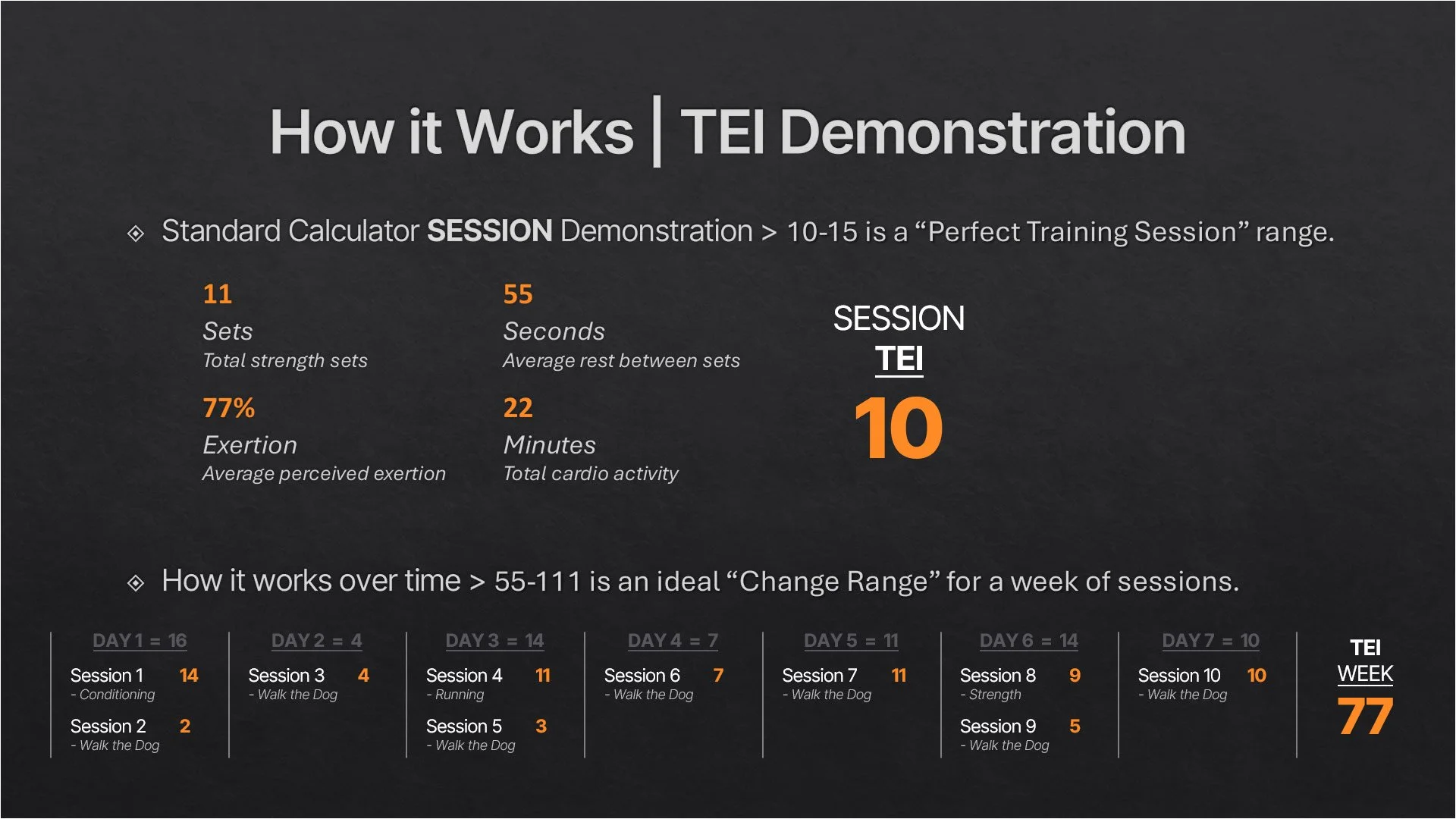
Here is an example of how the calculator works, what ideal ranges can be and the cumulative effect (value) your body is experiencing in a week:
Standard Strength Calculator | Review & Plan
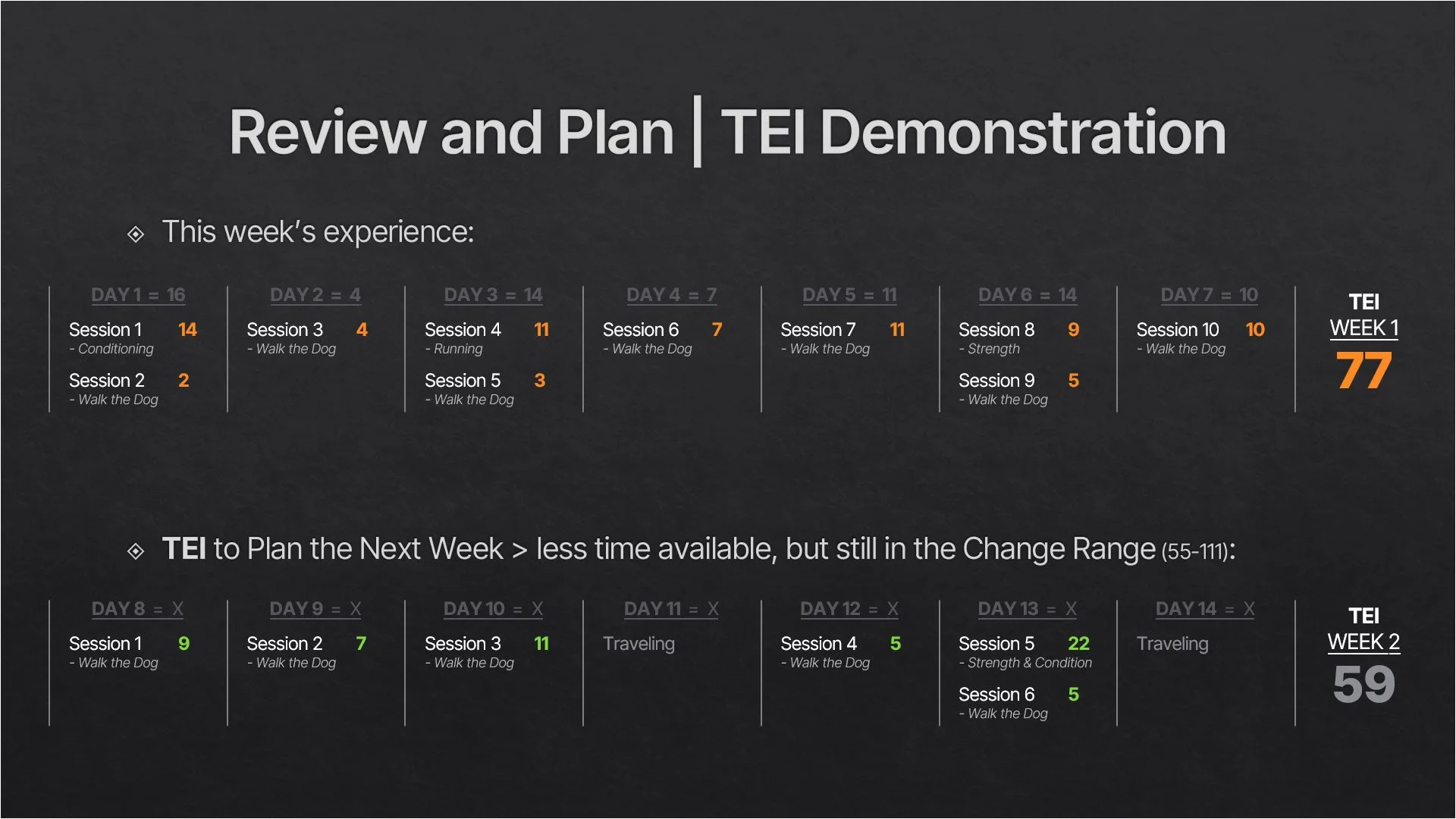
Then with that information (Review) you can learn what a certain value feels like and associate its value; from that you can then Plan your coming week and figure out when to do what TEI value and on which days based on your availability, AND still accomplish a total that is comfortably in YOUR “Change Range”.
The Business of the Beta Test
Please use this link to complete a short Beta Tester Bio survey, we would like to get to know the folks helping us with this Beta Test: Beta Tester Bio
Share Your Feedback – 3 categories
Report a Problem CLICK HERE
- A crash, error, unexpected result, or something doesn’t work.Share an Observation CLICK HERE
- Something confusing, surprisingly easy, useful, or worth improving.New Feature Idea CLICK HERE
- Something you'd like TEI to do, an additional capability you'd find valuable, or a new way to make the app more useful.
TEI Beta Test Support
Any questions or thoughts you’d like to share, please email us: contact@rhinoathletics.com

Or you can text us: (612) 494-4738